Skip to content

Photo of a manuscript spread out on a desk with highlighted sections and notes written on it.
Photo by Catherine Cronin; CC BY-SA 2.0

Do you have an article manuscript ready to submit for publication, but aren’t sure how to find the right journal? Finding an appropriate journal for your research can be daunting. With so many scholarly journals to choose from, it can be difficult to know where to start when selecting a journal. But don’t fret - Himmelfarb Library is here to help! There are tools available to help you navigate your options and find the right journal for your research!

Journal Selection Tools

There are numerous tools available to help you identify possible journals that could be a good match for your research. 

Abstract Matcher Tools

The following tools let you copy and paste your abstract into the tool, and they provide you with a list of possible journals that could be a good fit for your manuscript:

Publisher Manuscript Match Tools

Multiple large publishers also have services that will help you match your abstract to an appropriate journal. 

Journal Information Tools

Once you have a list of potential journals, do your research about each title to determine which journal would best fit your needs. The following tools provide information about specific journal titles that can help you decide where to submit your manuscript:

  • Journal Citation Reports: Look up key journals in your field, sortable by impact factor, Eigenfactor, and other metrics.
  • Cabells Directory of Publishing Opportunities: Look up journal titles to find contact information, manuscript and submission guidelines, and metrics to support selecting titles for submission. Cabells also tracks predatory journals, which are described further below..

Learn more about these tools in Himmelfarb’s video tutorial: Journal Selection Tools: Choosing the Right Journal for Your Research

Is Your Manuscript a Good Match for a Journal?

Journals usually have “information for authors” pages on their websites that lay out the Aims and Scope of the research they publish. Once you have a list of possible journals, take a look at the Aims and Scope sections of each journal's website and decide whether or not your manuscript matches the research and topics the journal normally publishes. If you’re not sure if your paper is a good fit for the journal, reach out to the journal editor, send them your abstract, and ask them if they think your manuscript is a good fit for the journal.

Making Sense of the Metrics

Journals advertise citation metrics to demonstrate their relative importance in the field. Journals with higher citation metrics are usually more selective in the articles they publish. Various metrics evaluate relative journal quality, and each metric uses different methods. These metrics signify how frequently articles published in a specific journal are cited in other journal articles. Two important metrics to consider are Journal Impact Factor and CiteScore.

Journal Impact Factor

Journal Impact Factor (JIF), calculated by Web of Science, can be found on the Journal Citation Reports website (may be paywalled for non-GW affiliates). The Journal Impact Factor is the number of times a journal is cited during a given year divided by the sum of the number of articles published during the previous two years. Learn more in our Journal Impact Factors: What You Need to Know tutorial.

CiteScore

CiteScore, similar to JIF, is calculated by Elsevier’s Scopus. CiteScore is the number of citations articles in a journal received during the last four years divided by the number of articles published in the same four-year period. Check out CiteScore Methodology to learn more about this metric.

Metrics and Your Manuscript

It’s important to have realistic expectations when selecting a journal for your research. Journals with higher JIF or CiteScores are more likely to publish cutting-edge research with novel or important findings. Research with less novel findings tends to find homes in journals with lower JIF or CiteScores. Knowing how likely your article is to be published in a journal with a higher or lower JIF and CiteScores can help you save time by submitting your manuscript to a journal with an appropriate JIF or CiteScore.

Open Access Journals and Support From Himmelfarb

Deciding whether to publish your manuscript as open access is another key decision to make when considering where to publish. Publishing open access will make your article publicly available to everyone. Publishing in a traditional subscription-based journal means that your article will be paywalled and only available to readers who subscribe or have access through a library's purchased subscription to the journal. The following terminology is important to know when considering publishing open access:

  • Fully Open Access: Every article is published Open Access and made publicly available to read. Authors are often required to pay Article Processing Charges (APCs) to cover the cost of publication.
  • Hybrid Journal: These journals allow authors to choose to pay an APC and publish their articles as Open Access or not pay an APC and have the article published behind a paywall.
  • Subscription Only or Closed Journal: These journals do not offer Open Access options, and all articles are published behind a paywall. These journals rely on revenue from libraries and other subscribers to pay for access via yearly subscriptions.

Free APCs at GW

GW has current “transformative agreements” with Cambridge University Press and The Company of Biologists that allow GW authors to publish research as open access at no cost to authors. Article Processing Charges (APCs) are waived with these publishers! Cambridge University Press publishes roughly 50 health sciences-related journals covered under this agreement. The Company of Biologists agreement includes 5 titles: 

Look Out for Predatory Journals

Before submitting your manuscript to a journal, do your due diligence to ensure that the journal is not predatory. Predatory journals pretend to be legitimate academic journals, promote false or misleading metrics, and have unethical business practices that fail to follow scholarly publishing best practices. Predatory journals often promise quick article publication, frequently lack a peer review process, and don’t have archiving policies, which can result in your work disappearing from the internet. 

Cabells Directory of Publishing Opportunities tracks predatory journals and provides violations of scholarly publishing best practices to help you avoid submitting your paper to a predatory journal. Be aware that not all predatory journals in the medical and health sciences fields are listed in this resource. If you have reservations about a title and can’t find it in Cabells, contact Ruth Bueter (rbueter@gwu.edu), who will investigate the journal on your behalf.

Learn more about how to identify predatory journals on Himmelfarb’s Predatory Publishing research guide.

Questions? Himmelfarb Can Help!

Still have questions about choosing a journal for your manuscript? Reach out to us at himmelfarb@gwu.edu, and we can help you navigate the resources discussed in this post!

Screenshot of a slide presentation. Text: Introduction to Systematic Reviews.

Do you have questions about systematic reviews? Ever wonder what the difference is between a systematic review and other types of literature reviews? Not sure what the steps are to conduct your own systematic review? Himmelfarb Library has a new Introduction to Systematic Reviews video series that can help answer these questions! Tom Harrod, Himmelfarb’s Associate Director of Reference and Instruction, breaks down key aspects of systematic reviews in five short videos (6 minutes or less), each covering easily digestible aspects of systematic reviews to help you learn the basics.

Types of Literature Reviews

Part 1 covers the different kinds of literature reviews and what makes systematic reviews unique. You’ll learn about the time frame, purpose, methodology, search strategy, article searches, and protocols of systematic reviews and how they compare to other types of literature reviews.

Systematic Review Steps

In Part 2, you’ll learn the steps involved in conducting a systematic review. Systematic reviews follow a well-defined methodology intended to minimize bias and ensure a high level of reproducibility. Learn more about this methodology in this video!

Effective Search Strategies

Part 3 examines how to create effective search strategies. Learn how to convert a research question into a PICO or PEO framework, use the PICO or PEO framework to create an initial search strategy, test and refine your search, and use your search in other databases in this video.

Overcoming Common Search Problems

Part 4 of this series explores common issues that arise with search strategies and how to address them. You’ll learn strategies for what to do when your initial search strategy doesn’t work as planned and you don’t get the results you expected.

Covidence

In Part 5, you’ll learn how to streamline the process of conducting systematic reviews with the Covidence software, available to GW Affiliates through Himmelfarb Library. Covidence is designed to guide you through the process of conducting a systematic review, facilitate teamwork, and help you document and maintain the records needed to write your systematic review. In this video, you’ll learn how to access Covidence through Himmelfarb and how to use the key features of this software.

Take the mystery out of systematic reviews and watch these easy and approachable videos!

Picture of art papers and supplies spread on a desk with the word "Welcome" written in calligraphy on the center paper.
Photo by cottonbro studio

Himmelfarb Library extends a warm welcome to all new residents, fellows, students, faculty, and staff who joined the GW SMHS, GWSPH, and GW Nursing community recently! We are excited that you’re here, and we look forward to serving you during your time at GW! 

The start of any new endeavor can be daunting, so we’d like to make it easy for you to become familiar with Himmelfarb Library and all that we have to offer. Himmelfarb Director, Laura Abate, gives a great overview of Himmelfarb Library in this short video tour:

Himmelfarb Hours:

Our physical space, accessible through Ross Hall, is currently open the following hours for the summer:

Monday - Thursday: 7:30 am - Midnight

Friday: 7:30 am - 10:00 pm

Saturday: 8:00 am - 10:00 pm

Sunday: 8:00 am - Midnight

Current hours of operation are available on our website and include exceptions to normal hours, such as holiday closures. If you aren’t able to make it to the library in person, you can get help from our librarians and staff via chat or phone (202)994-2850, or email himmelfarb@gwu.edu. Our databases, journals, and e-books are available from anywhere, anytime, so you can access our electronic resources from anywhere!

Himmelfarb Resources and Collections

Himmelfarb’s collection extends beyond the books in the basement level stacks. We have 130 databases to search, including PubMed, CINAHL, and our library discovery service, Health Information @ Himmelfarb. Health Information @ Himmelfarb enables you to search physical and electronic books, journals, articles, dissertations, and more, all from a single search box.

Want to browse and read articles from our journals? The BrowZine app is a great option! BrowZine can be accessed through a browser, or you can download the app for IOS or Android. You’ll be able to create a personalized bookshelf of journal titles, follow your favorite journals, get alerts when new issues are available, and browse a table of contents.

LibKey Nomad provides quick and easy access to full-text when searching PubMed, Scopus, EBSCO databases, Google Scholar, Amazon, and publisher sites. With LibKey Nomad, you’ll easily be able to tell when the full-text of articles and e-books is available through Himmelfarb, and often can get the PDF with a single click!

You can find books and e-books via Health Information @ Himmelfarb or explore titles in specific collections: AccessMedicine, ClinicalKey for Nursing, LWW Health Library: Medical Education, etc. You can browse all e-book collections or view our special collections in Health Information @ Himmelfarb. Our print books are located on the basement level and can be borrowed for three weeks, with up to two renewals. 

If we don’t have a resource you need, we can get it for you through the Consortium Loan Service or Documents2Go. The Consortium Loan Service provides free loans of books from most DC area academic libraries. Documents2Go provides scanned articles, book chapter copies, or physical book loans with up to 30 free requests a year for Himmelfarb users.

Clinical Tools and Apps

If you’re providing patient care, Himmelfarb has specialized apps and information services to support you. The DynaMed, and Lexicomp apps can be downloaded for easy access from your device. Check out our App Shelf for a full list of useful tools.

Research Support

Himmelfarb is more than just a physical space with study space and great resources! Our librarians and staff can help support your research by assisting in literature searches, systematic reviews, and helping you organize your sources with RefWorks or Covidence. We also offer a spectrum of services and support related to scholarly publishing - everything from honing your research question, to selecting the right journal for submitting your article to archiving your article and data.  Get help with your research from our knowledgeable librarians and staff by stopping by our circulation desk for in-person help, or use our Ask a Librarian service to chat virtually with a real Himmelfarb librarian or staff member. No AI chatbots here! 

Connect with Us!

Connect with us on Instagram, Facebook, LinkedIn, and YouTube for the latest Himmelfarb news and updates! Subscribe to our blog to make sure you never miss a post!

From all of us at Himmelfarb Library, we’d like to welcome all of the new residents, fellows, students, faculty, and staff who joined the GW SMHS, GWSPH, and GW Nursing community this month! We are thrilled that you’re here and we look forward to serving you during your time at GW! We know that the start of any new endeavor can be daunting, so we’d like to make it easier for you to get to know Himmelfarb Library.

To help you get the lay of the land, watch this short, video tour of the library with Himmelfarb’s Library Director, Laura Abate:

Himmelfarb Hours 

Our physical space, accessible through Ross Hall, is open the following hours:

Monday - Thursday: 7:30 am - Midnight

Friday: 7:30 am - 10:00 pm

Saturday: 8:00 am - 10:00 pm

Sunday: 8:00 am - Midnight

Our current hours of operation are available on our website and include exceptions to normal hours (i.e. holiday closures). If you can’t make it to the library in person, you can get help from our librarians and staff via chat or phone (202-994-2850), or email himmelfarb@gwu.edu. Our databases, journals, and e-books are available 24/7, so even when our building is closed, you can access our electronic resources from anywhere.

Himmelfarb Resources and Collections

Himmelfarb’s collection is much larger than just the books in our stacks. We have 125 databases to search, including PubMed, Scopus, and CINAHL. The search bar towards the top of our library homepage, known as Health Information @ Himmelfarb, can be used to search for physical and electronic books, journals, articles, dissertations, and more all in just a single search box! 

You can also browse and access our collection of journals from our e-journals page, or by using BrowZine. You can use BrowZine directly from your internet browser, or download the app to your IOS or Android device. BrowZine allows you to create a personalized bookshelf of journal titles, follow your favorite journals, and create alerts for new issues and tables of contents.

Here’s another pro tip: installing the LibKey Nomad browser extension on your favorite browser will provide easy access to full text when searching PubMed, Scopus, EBSCO databases, Google Scholar, Amazon, publisher sites, and more. With LibKey Nomad, you’ll be alerted when the full-text articles and e-books are available from Himmelfarb, and be able to get the PDF with a single click in most cases.

We also provide a wide range of e-books from AccessMedicine, ClinicalKey, EBSCOhost, and R2 Digital Library. You can browse our e-book collections, view our special collections in Health Information @ Himmelfarb, or search for any book via the Health Information @ Himmelfarb search tool on our homepage. We also have print books on the basement level of Himmelfarb. Most print books can be borrowed for three weeks with an additional two renewals. If we don’t have a book or article that you need, we can get it for you through our Consortium Loan Service or Documents2Go services. 

Clinical Resources

Himmelfarb provides specialized apps and information services to support those of you who provide patient care. DynaMed and Lexidrug are our go-to resources for easy access to clinical care resources. If you want resources available on your smartphone or other mobile device, check out our App Shelf to download apps to selected resources. Learn more about resources available to residents on our Residents and Fellows Guide!

Research Support

Himmelfarb is more than just a physical space with lots of study space and great databases, journals, books, and e-books! Our librarians and staff can support you in your research by helping with literature searches, conducting systematic reviews, and organizing sources with RefWorks or Covidence. We can also help guide you through the constantly evolving scholarly publishing landscape through our author services

Get help with your research from our knowledgeable reference librarians and staff. Stop by our circulation desk to get your questions answered in person, or use our Ask a Librarian service to chat with a reference librarian virtually. Our Ask a Librarian service is staffed by real Himmelfarb librarians and staff so you can be sure you’re getting the help you need! We also have a wealth of research guides that can connect you with resources on a variety of topics. 

Connect with Us!

Connect with us on Instagram, Facebook, LinkedIn, and YouTube for the latest Himmelfarb news and updates! Subscribe to our blog to make sure you never miss a post!

We look forward to serving you! Welcome to the GW community!

Using RefWorks shouldn't be intimidating, check out our tutorials to start importing references today.

Overcoming the inertia to write a research project can be more difficult than actually writing it. 

The blank document only grows more intimidating if you don’t remember previous research, or if you know that after writing, you’ll still need to find and compile all of your sources from note apps, half-references in drafts, and scraps of memory. 

Fortunately, tools like RefWorks help smooth the path during both research and writing. 

With RefWorks, you can aggregate and save references from our major databases like PubMed, CINAHL, and Scopus; collaborate with the Google Docs add-on; and create bibliographies (in APA 7th, AMA, etc), importing them with the Microsoft word plug-in. 

Himmelfarb staff have created a great one-stop RefWorks guide.

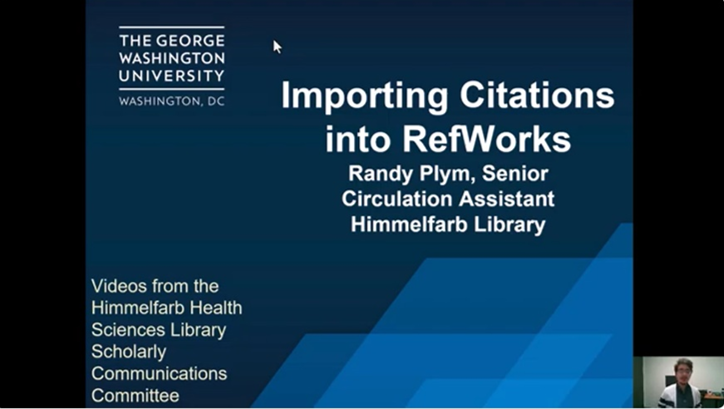
However, if that’s overwhelming, check out this video tutorial on importing citations from PubMed or CINAHL into Refworks and start using RefWorks today!

If you have any questions, reach out to our Reference and Instructional staff at himmelfarb@gwu.edu, or 202-994-2850.

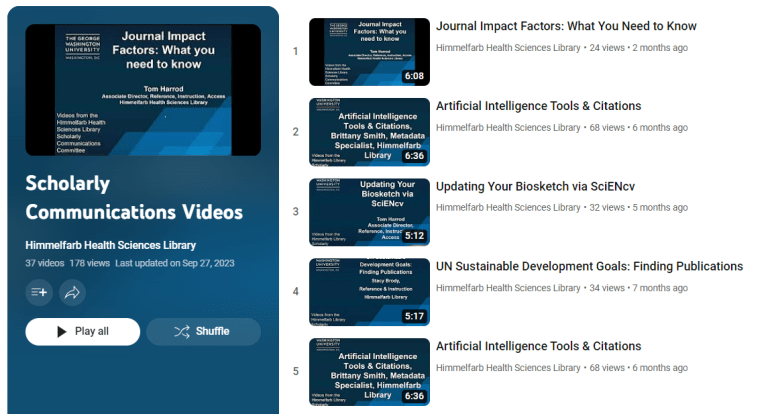
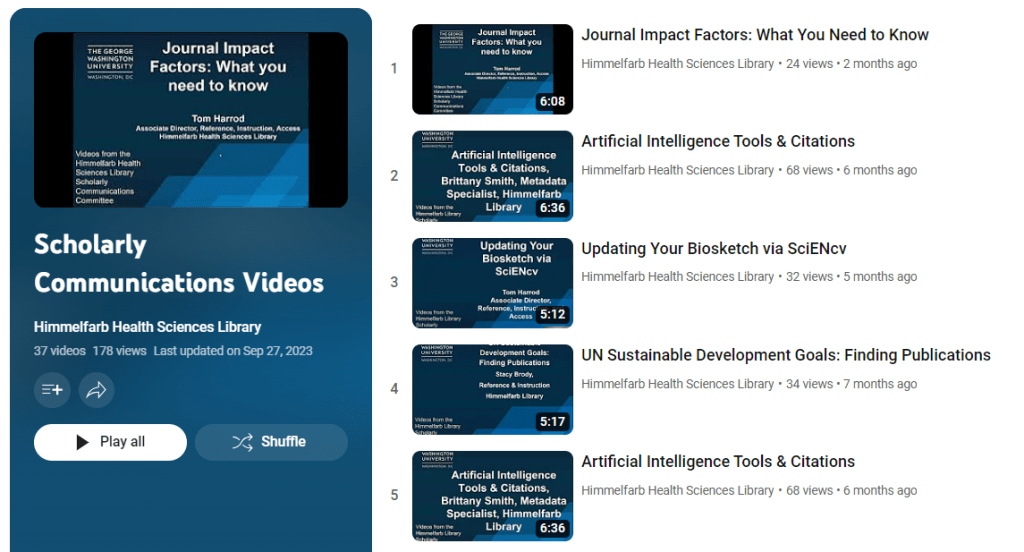
Screenshot of the Scholarly Communications Videos playlist from YouTube.

Are you interested in scholarly publishing, but aren’t sure where to start? Himmelfarb Library has a library of short video tutorials focused on a variety of scholarly publishing topics! We add new videos to this library each semester, so the library is always growing. Videos range from 3 to 10 minutes in length, so you can learn in small chunks of time that fit your schedule. Here are some of our newest videos!

Journal Impact Factors: What You Need to Know

In this video, Tom Harrod, Himmelfarb’s Associate Director of Reference, Instruction, and Access discusses journal impact factors. You’ve probably heard that journals with higher Impact Factors are more reputable, and are more desirable when the time comes to publish your research. But what is a journal Impact Factor exactly? And how is an Impact Factor calculated? This six-minute video answers both of these questions and also explores how to address Impact Factors in context and why some journals don’t have an Impact Factor.

Artificial Intelligence Tools & Citations

In this 6-minute video, Himmelfarb’s Metadata Specialist, Brittany Smith, explores generative artificial intelligence tools. This video starts off by discussing the emergence of AI and the importance of checking current guidelines and rules regarding AI, as this is a new and constantly evolving field. This video discusses how AI can help with your research, discusses GW’s AI policy, and how to create citations for AI in your research. 

Updating Your Biosketch via SciENcv

Tom Harrod discusses the differences between NIH’s ScieENcv and Biosketch and demonstrates how to use SciENcv to populate a Biosketch profile in this 5-minute video. 

UN Sustainable Development Goals: Finding Publications

In this 5-minute video, Stacy Brody explores why the United Nations' sustainable development goals were developed, and the intended achievements of these goals. This video discusses how to find publications related to these goals using Scopus.

Dimensions Analytics: An Introduction

Sara Hoover, Himmelfarb’s Metadata and Scholarly Publishing Librarian provides a brief overview of the Dimensions database and discusses how to access Dimensions from Himmelfarb. This 7-minute video also provides several examples of use cases for this great resource!

In addition to these great videos, you can find the full 37-video library on the Scholarly Communications YouTube Playlist and on the Scholarly Publishing Research Guide. Additional videos cover a wide range of topics including:

  • Project planning and development videos:
    • Research life cycle
    • Advanced literature searches using PubMed MeSH search builder
    • CREDiT taxonomy
    • Human participants' research support
  • Publishing-related videos:
    • Clarivate Manuscript Matcher
    • Including Article Processing Charges (APCs) in funding proposals
    • Changing from AMA to APA citation style
    • How to cite legal resources using APA style 
  • Project promotion and preservation videos:
    • Tracking citations with Scopus
    • Creating a Google Scholar profile
    • Archiving scholarship in an institutional repository
    • How to promote your research.

photo of coffee in teacup with open notebook, pen and laptop
Image from pxfuel.com

Himmelfarb Library’s Scholarly Communications Committee produces short tutorial videos on scholarly publishing and communications topics for SMHS, GWSPH, and GW School of Nursing students, faculty, and staff. Five new videos are now available on our YouTube channel and Scholarly Publishing Research Guide!

2023 NIH Data Management and Sharing Policy Resources by Sara Hoover - Sara is our resident expert on data management policy and resources. She provides an overview of the NIH policy, the essential elements of a data management and sharing plan, and highlights GW and non-GW resources that can aid you in putting together a data management and sharing plan. The video is 10 minutes in length. 

Animal Research Alternatives by Paul Levett - Paul demonstrates how to conduct 3Rs alternatives literature searches for animal research protocols. He defines the 3Rs and explains how to report the search in the GW Institutional Animal Care and Use Committee (IACUC) application form. Paul is currently a member of the GW IACUC. The video is 13 minutes long.

Artificial Intelligence Tools and Citations by Brittany Smith - As a Library Science graduate student, Brittany has an interest in how AI is impacting the student experience. She discusses how tools like Chat GPT can assist with your research, the GW policy on AI, and how to create citations for these resources. The video is 6.5 minutes in length.

UN Sustainable Development Goals: Finding Publications by Stacy Brody - Stacy addresses why the goals were developed, what they hope to achieve, and shows ways to find related publications in Scopus. The video is 5 minutes long.

Updating Your Biosketch via SciEncv by Tom Harrod - Tom talks about the differences between NIH’s SciEncv and Biosketch and demonstrates how to use SciEncv to populate a Biosketch profile. Tom advises GW SMHS, School of Nursing, and GWSPH researchers on creating and maintaining research profiles and he and Sara provide research profile audit services. The video is 5 minutes long.

You can find the rest of the videos in the Scholarly Communications series in this YouTube playlist or on the Scholarly Publishing Research Guide.

Are you interested in examining how health and other news is being reported to television audiences? Are you interested in gaining a historical perspective on health topics through broadcast news? The Vanderbilt Television News Archive is a unique resource to help you do this. 

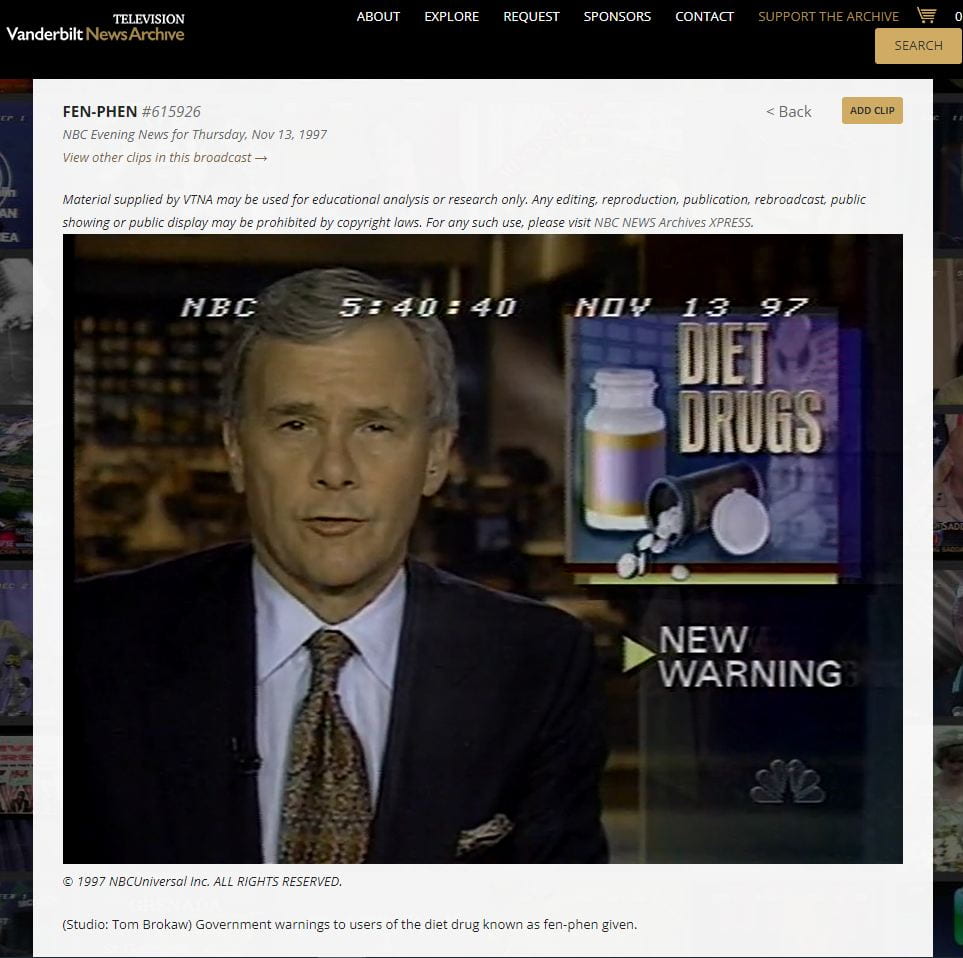
Screenshot of NBC news report from 1997, Tom Brokaw on warning about diet drug fen-phen.
Streaming content is available from CNN and NBC.

The archive, housed at Vanderbilt University, has been recording and indexing national nightly news broadcasts from the United States since August 5, 1968. Initially the news broadcasts recorded included only the “big three” networks, ABC, CBS, and NBC. With the creation of CNN and Fox News, additional news content was added to the archive. Broadcasts are indexed and made keyword searchable.

While not all news networks provide their streaming content to the archive, Vanderbilt has been able to reach agreements with two networks, CNN and NBC, to provide streaming content within the archive’s web interface. Where streaming video is available, there will be a link to play the content. 

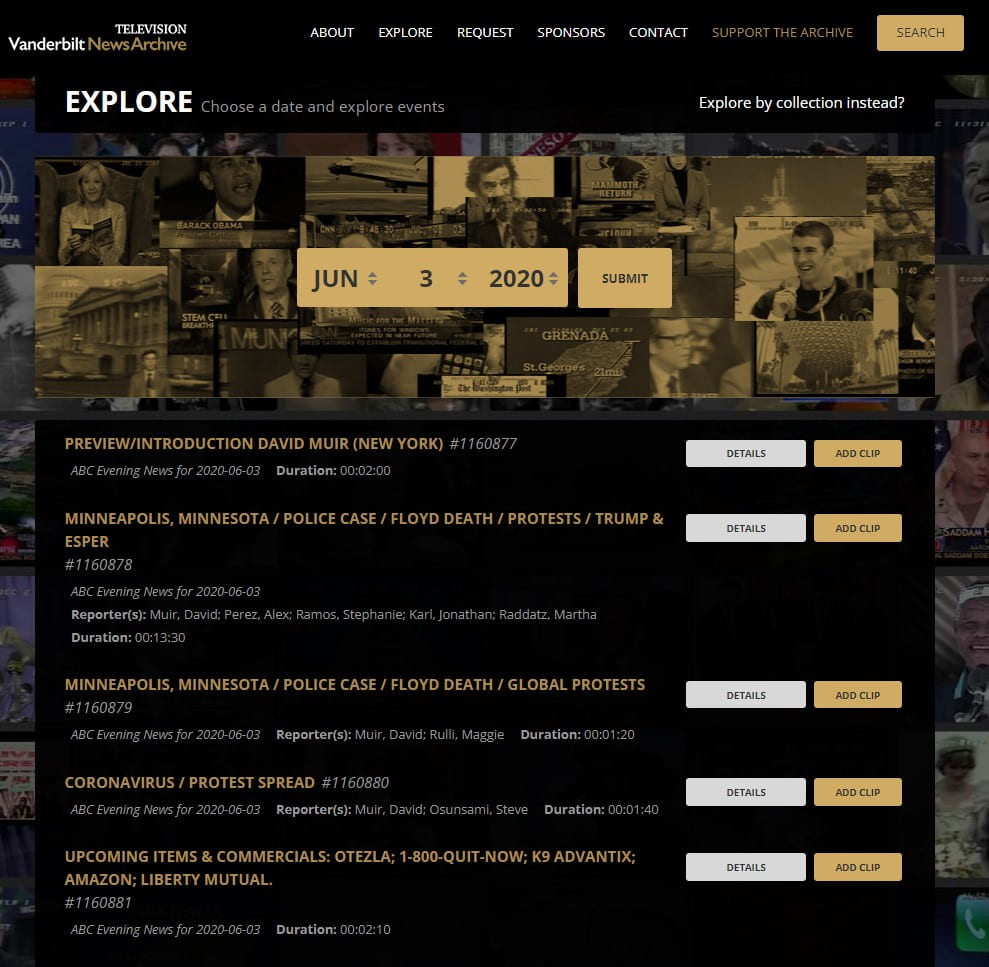
You can search the archive by browsing for news from a particular date, going as far back as August 1968. Browsing by date reveals summaries of all the segments within that day’s broadcasts from all available networks. The summary shows the topic of the segment, its length, and lists the reporters for that segment.

Screenshot of news broadcast segments from June 3, 2020.
Browsing the archive by a specific date is one option.

Another interesting feature of the broadcast summary is that it details which products (including medications) were advertised during commercial breaks. Where streaming content is available, you can view those advertisements.

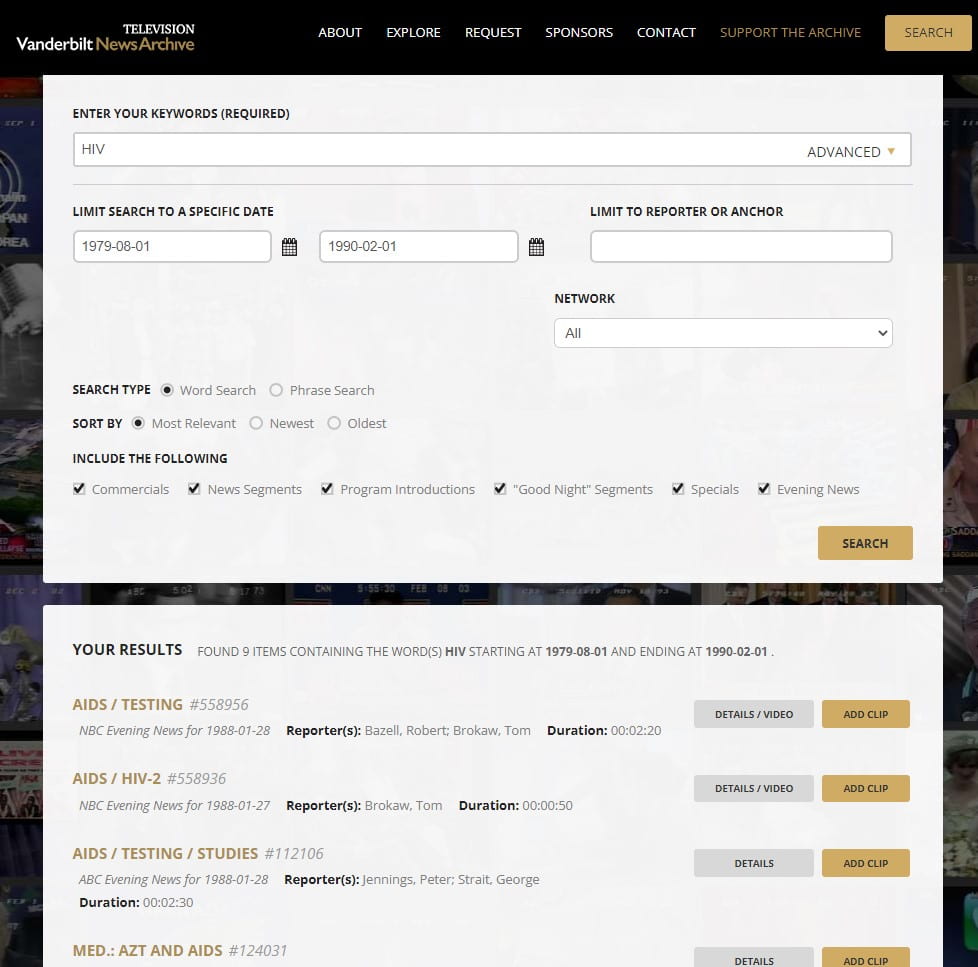
You can also search by keyword to produce a list of broadcast segments with relevant content, limiting by date range if desired:

Screenshot of a keyword search of the news archive for HIV, limiting to dates between 1979 and 1990.
Keyword searching the archive is another option.

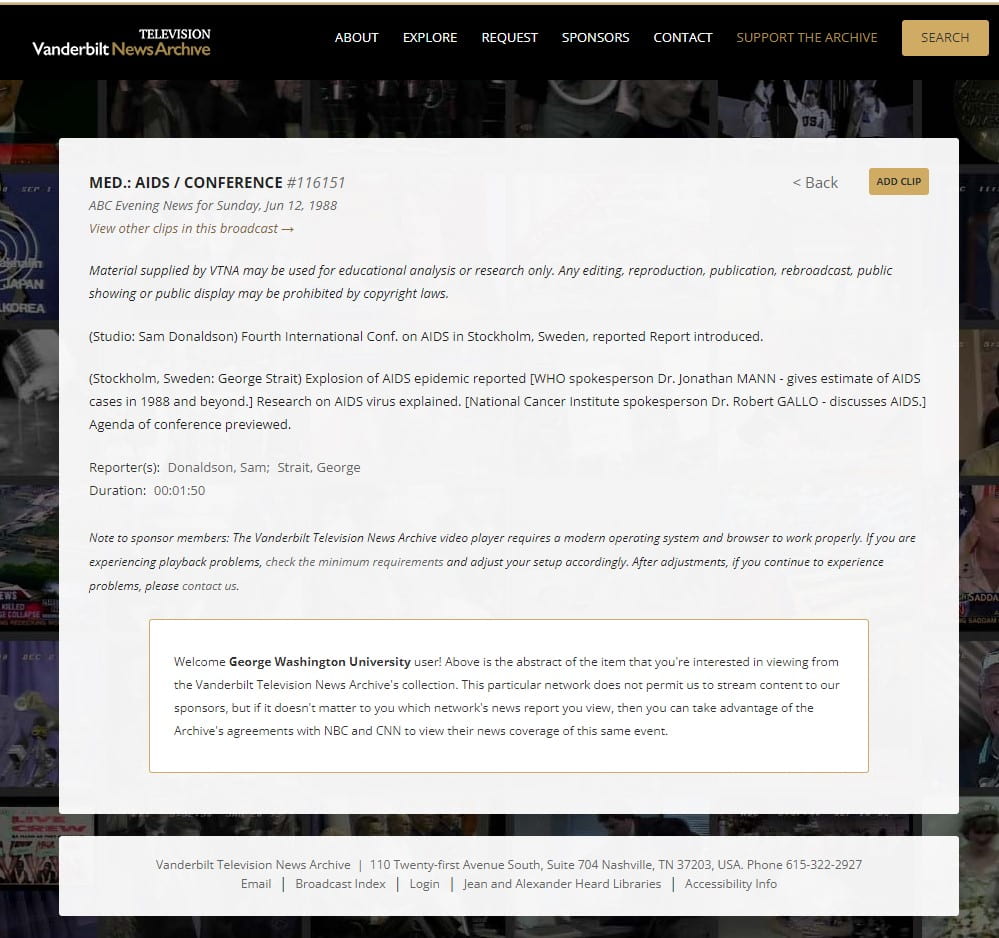
For networks from which only an abstract of a broadcast is available, the information provided is robust enough to establish the content of the report, its length, and the interviews included:

Screenshot of summary of June 12, 1988 ABC Evening News report on AIDS conference. Anthony Fauci is interviewed.
Even when streaming content is unavailable, each segment is described in detail.

The Vanderbilt Television News Archive is a fascinating way to watch the evolution of health topics and other issues and events over time. This unique resource lets you explore, for example, the way in which HIV/AIDS was discussed in the earliest newscasts on the subject; trace media coverage of the beginning of the COVID-19 pandemic, either via keyword search or browsing broadcasts by date; examine changes in the way medications were advertised on national television; and so much more.

Access to clips from the archive which are not available for streaming are generally assessed a loan fee, with full details available on the Request page. However, researchers located in the Washington, DC area can access full streaming content from the archive at the Library of Congress Moving Image Research Center. Appointments to use the facility are required, and can be made here.

NEW in large font on an orange brick wall.
Photo by Nick Fewings on Unsplash

Himmelfarb Library’s Scholarly Communications Committee is pleased to announce five new short video tutorials have been added to our video library! This video library now includes 30 short 3-7 minute videos on a variety of scholarly publishing topics, perfect for microlearning! This round of new videos covers topics including human participant research support, addressing health misinformation and disinformation, using Dimensions Analytics, Cabells Journalytics, and finding an author’s H-Index using Google Scholar and Scopus.

Human Participants Research Support - Fall 2022

Are you interested in learning more about the resources available to support human participant research at George Washington University? This video includes information about the Office of Human Research (OHR), Institutional Review Boards (IRB), and CITI Training available through GW in this short three and half minute video.

Addressing Health Mis- and Dis- Information

This five-minute video discusses how to address health mis- and disinformation. Learn the difference between mis- and disinformation, the different types of mis- and disinformation, why this matters in relation to healthcare providers and health literacy, and how to address mis- and disinformation with patients. 

Dimensions Analytics: An Introduction

Dimensions, a database from Digital Science, tracks research output and has information about grants, publications, datasets, clinical trials, policy documents, and more. This tutorial provides a brief overview of Dimensions Analytics, which allows you to track and visualize research output trends, and allows for more comprehensive functionality. Several examples of use cases are also included.

Cabells Journalytics

This five-minute tutorial provides an overview of Cabells Journalytics, a tool that can be used to evaluate and compare journals in which to publish a manuscript. Learn how to access Cabells Journalytics, and see example journal records to see the depth of information provided about each journal. You’ll also learn how to compare up to five journals.

H-Index: Google Scholar vs. Scopus

In this five-minute tutorial, you’ll learn more about what the H-Index is (a measure of both quantity and quality of research output) and how it is used to track researcher productivity. This tutorial will then walk you through how to find an H-Index using both Google Scholar and Scopus, and why there is sometimes a difference in the H-Index value between these two sources.

This newest installment of videos is part of the Scholarly Communications Committee’s Short Video Series, which covers a wide range of scholarly communications-related topics and covers all phases of the research life cycle. Have a scholarly publishing topic that you’d like us to discuss? We’d love to hear from you! To suggest a topic for an upcoming video, please contact Sara Hoover at shoover@gwu.edu

To learn more about scholarly publishing, check out our Scholarly Publishing Guide. This guide includes resources to help scholars find an appropriate journal in which to publish their research, tips on how to spot and avoid predatory publishers, and information on how to promote and increase the visibility of your published research.

[Photo Credit: Women of Color in Tech]

Himmelfarb Library’s Scholarly Communications Committee is pleased to announce five new short lectures have been added to our video library! This round of videos cover topics such as finding article publishing charges (APC) costs, changing citation styles in PubMed, contextualizing preprints and more. 

Locating Article Publishing Charges (APCs)- In this video, you’ll learn about Article Publishings Charges (APCs), how to find them on a publisher’s website and at the end of the tutorial, receive some tips that will help you handle APCs. 

Changing Citation Styles in PubMed- Would you like to learn how to switch from AMA to APA or MLA? This video will focus on changing citation styles when generating citations in PubMed.

Locating Manuscript Guidelines- Learn how to locate manuscript preparation guidelines and author resources for scholarly journals. This tutorial will guide you through three different journal websites to show you where manuscript guidelines are typically located. 


Finding Journals with JCR- In this tutorial, you’ll learn about the Journal Citations Report database and how it can help you discover scholarly journals where you can submit your research for publication.

APA Citations for Legal Resources-  Are you familiar with the Bluebook legal citation style? Do you want to cite case law, but are unsure of the proper citation format?This video will provide a basic introduction to this citation style used by the APA which is useful when citing legal resources.

These videos and the committee’s other videos from previous lectures are located under the ‘Scholarly Communications Video Tutorials’ tab on the Scholarly Publishing guide. The guide also includes resources to help scholars find a journal that will publish their research, tips on how to spot and avoid predatory publishers, ways to increase the visibility of your published research and more!

 The Committee is working on another set of videos that will be released during the fall semester 2022. The committee members are eager for feedback and/or suggestions for video topics. We would love to hear from you! If you have a scholarly publishing topic that you’d like the committee to discuss, please contact the committee chair, Sara Hoover, at shoover@gwu.edu.