
Skip to content

Social engineering - the art of exploiting human psychology, rather than technical hacking techniques, to gain access to buildings, systems, or data.

Cyber attackers manipulate victims (targets) into making poor choices that enables direct and indirect criminal activity

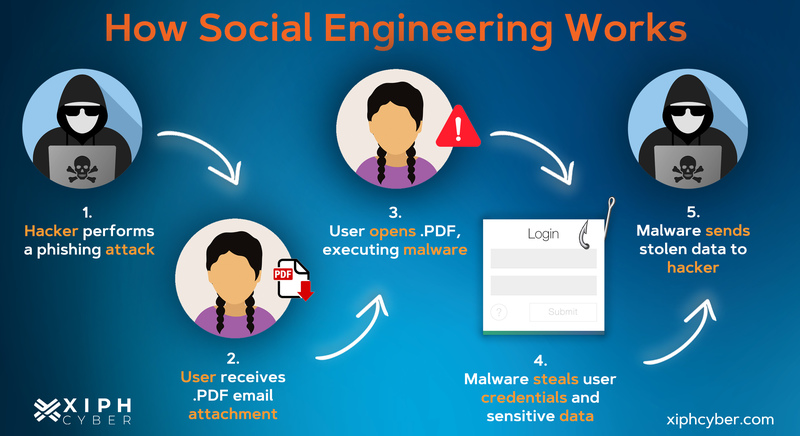
Social Engineering attacks are conducted using various methods. The general process involves an attacker sending messages or otherwise contacting potential victims. Once the attacker has established contact, either directly with a victim responding or indirectly when a victim clicks a link or downloads an attachment, they steal user information such as account credentials, personal information, and funds. In some cases the attacker installs malware on the victims device to steal data as well as use the device to launch attacks against others.
 

Phishing

Phishing is a very simple and useful tool in an attacker’s arsenal. Phishing can lead to the exposure of sensitive information such as usernames, passwords, PII (personally identifiable information), and credit card information. So what is Phishing? It is at method used to obtain sensitive information from a victim that leverages social engineering and communications technologies that people use every day. There are various methods of phishing, with the most common being email, vishing (voice phishing), and smshing (text phishing). These methods can be blanket attempts that rely on quantity instead of quality (often called campaigns) or they can be very carefully crafted attacks with very specific targets (spear phishing and whaling). Luckily, identifying and defeating these attacks can be simple if you know what to look out for.

Social Engineering

Email Phishing

Email is the hacker’s go-to for most phishing attacks; people wouldn’t think twice about receiving an email. Often phishing emails will contain a malicious link, a malware attachment, or directly ask for sensitive information. In order to trick victims, these emails are crafted to appear from a big company, such as FedEx, Apple, or even from inside your own organization. Attackers use look-a-like or spoof emails to convince the target the email is legitimate. This can lead to compromised systems and/or exposed personal information, which can lead to further exposure of friends, family, and the victim’s organization.

Defeating Email Phishing:

  • Is the company logo/banner/design slightly off?
  • Would this person/company normally be sending you an email?
  • Should they already have the information they are asking for?
  • Never open unsolicited attachments
  • Legitimate Companies should never ask sensitive information through email
  • Use other methods to confirm the communication

Vishing

Voice phishing is growing in popularity and just like other types of phishing, vishing can be automated making it a dangerous tool. Attack examples include an “FBI” automated message, “IRS” tax refund/payment notification, or as a call from your local home improvement company. When attackers get on the line with their target they present a well thought out and engaging backstory to hook their victims. Impersonation is used in most vishing calls; attackers will impersonate IT staff, management in your company, and HR to appear official.

Defeating Vishing:

  • Ask the caller to provide information only you and they would know to ensure the caller’s identity
  • Never give sensitive information over the phone
  • If the call is suspicious, contact someone close to the individual, or through other means
  • Offer to call the individual back at the number in your staff/corporate directory, or at the number listed on the legitimate website

Smishing

Smishing sends texts to the targets phone in hopes of them clicking a malicious link, downloading malware, or returning sensitive information. Texts follow email phishing outlines and can be identified similarly. Many victims fall for smishing because they are unaware of the tactic and more trusting of texts. Don’t trust it more just because it’s a text message.

Defeating Smshing

  • Never provide sensitive information over text message
  • Would this person/company normally be sending you a text or make direct requests?
  • Use alternative methods to confirm the communication is actually from the real person.
  • Avoid following random links
  • If you are unsure, reach out to your security team, or the communicating company
  • Do not call the number that texted you

Spear-phishing, Whaling & Campaigns

Most individuals come into contact with phishing campaigns. The goal of campaigns are to reach as many people as possible and hope for a hit. Whereas, spear phishing and whaling are techniques aimed at selected groups of individuals and executives. These are well planned, crafted, and executed, and shouldn’t be taken lightly. They aim to compromise victims with privileged access to systems, accounts, and resources. Victims typically don’t have the time to review these carefully crafted emails highly specific to the target and fall for the trap.

Defeating Spear-phishing and Whaling

  • Report suspicious emails looking for information to security
  • Verify communication with the contact through other methods
  • Attackers often impersonate colleagues, friends, and family
  • Always assume you’re a target
  • Opt for face to face meetings for confirmation of requests when possible (online or in person)

Pretexting

Pretexting is a more focused form of social engineering where attackers use detailed and convincing backstories to gain access to systems or information. This method often involves impersonating someone in a position of authority or a trusted entity to manipulate victims.

Defeating Pretexting:

  • Avoid forwarding requests to subordinates and others asking them to 'take care of this' as this may convey legitimacy to the fraudulent request.
  • Confirm any backstory by contacting the relevant person or office directly.
  • Be suspicious of anyone asking for credentials, financial information, or access to systems.
  • Verify the legitimacy of requests, whether they involve money transfers, accessing login portals, or providing sensitive information.
  • Would this person/company normally be sending you a text or making direct requests?
  • Use alternative methods to confirm the communication is actually from the real person.

For more information [external link to Crowdstrike.com content]


unofficial GW hippo mascot holding a lockThis post is presented by the GW IT Cybersecurity Risk and Assurance team.

#SecuringGW is a shared responsibility, so if you see something, say something. Report suspicious digital activities, including phishing emails, to abuse[@]gwu.edu. 


IT Support Questions? For IT support, please contact the Information Technology Support Center at 202-994-GWIT (4948), ithelp[@]gwu.edu, or visit ithelp.gwu.edu

The following Infographic highlights 6 Phishing Red Flags. These tips will assist you in identifying malicious messages.

GW Information Technology Logo
6 Phishing Red Flags
1 - URGENT OR THREATENING LANGUAGE
Phishing attempts often create a sense of urgency or use threatening
language to prompt immediate action.  Phases like

This post is presented by the GW IT Cybersecurity Risk and Assurance team.

#SecuringGW is a shared responsibility, so if you see something, say something. Report suspicious digital activities, including phishing emails, to abuse[@]gwu.edu.


IT Support Questions? For IT support, please contact the Information Technology Support Center at 202-994-GWIT (4948), ithelp@gwu.edu, or visit ithelp.gwu.edu

Longer passwords make brute force attacks more difficult. Brute force attacks involve malicious actors using powerful computers to guess your password. As you can see in the following chart provided by researchers at Hive Systems, the best protection against Brute Force attacks are complex passwords containing at least 13 upper and lower case letters.

It is estimated that passwords of this moderate complexity will take 241 million years to crack.

Adding numbers to the moderate complexity password containing 13 upper and lower case letters increases the password resilience against compromise to 2 billion years.

An even more secure password that adds symbols, would increase the 13 character password resilience to 11 billion years.

For extreme protection, particularly to guard against improvements in processing power of computers, an 18 character password containing numbers, upper and lower case letters, and symbols would take an estimated 19 quintillion years to compromise.

It is important to note that password complexity protects against automated guessing. A 13 character password that contains mixed case words may be difficult for a computer to compromise. However, access to personal information may enable a person to guess a password much more easily than a computer. Consider the implications of family names, birthdates, and occasions being shared on social media and how this information provides some contextual information that could assist someone in their password guessing attempts.

Source: Hive Systems https://www.hivesystems.io/password


This post is presented by the GW IT Cybersecurity Risk and Assurance team.

#SecuringGW is a shared responsibility, so if you see something, say something. Report suspicious digital activities, including phishing emails, to abuse@gwu.edu


IT Support Questions? For IT support, please contact the Information Technology Support Center at 202-994-GWIT (4948), ithelp@gwu.edu, or visit ithelp.gwu.edu

GW Cyber Risk - One Minute Read

The FTC provides information concerning fake text messages you might receive. We have included excerpts of the content below as well as a link to the full article. The article describes the problem, provides examples, as well as offers tips on actions you can take if you receive fraudulent texts. Our bottom-line advice, validate text messages prior to taking actions they request using one or more of the following:

  • Pause and think before replying or following links. Even 'urgent' shipping notices can wait a few minutes.
  • Check you order history on merchants' websites. You have alternative means to check on order shipping status.
  • Review order confirmations and shipping updates in email messages to cross reference order messages.
  • Contact the sender, whether it is your boss or someone else, through a trusted method to verify they were the author and confirm details.

How to Recognize and Report Spam Text Messages - FTC Article

Excerpted from: https://consumer.ftc.gov/articles/how-recognize-and-report-spam-text-messages#what_to_do

If you have a cell phone, you probably use it dozens of times a day to text people you know. But have you ever gotten a text message from an unknown sender? It could be a scammer trying to steal your personal and financial information. Here’s how to handle and report unwanted text messages.

fraudulent SMS text example

Spam Text Messages and Phishing

Scammers send fake text messages to trick you into giving them your personal information — things like your password, account number, or Social Security number. If they get that information, they could gain access to your email, bank, or other accounts. Or they could sell your information to other scammers.

Scammers often try to get you to click on links in text messages by promising you something. Scammers might

  • promise free prizesgift cards, or coupons — but they’re not real
  • offer you a low or no interest credit card — but there’s no deal and probably no card
  • promise to help you pay off your student loans — but they won’t

Scammers also send fake messages that say they have information about your account or a transaction. Scammers might

  • say they’ve noticed some suspicious activity on your account — but they haven’t
  • claim there’s a problem with your payment information — but there isn’t
  • send you a fake invoice and tell you to contact them if you didn’t authorize the purchase — but it’s a scam
  • send you a package delivery notification— but it’s fake

The messages might ask you to give some personal information — like how much money you make, how much you owe, or your bank account, credit card, or Social Security number — to claim your gift or pursue the offer. Or they might tell you to click on a link to learn more about the issue. Some links might take you to a spoofed website that looks real but isn’t. If you log in, the scammers then might steal your username and password.

For more information and the full article please visit the FTC website https://consumer.ftc.gov/articles/how-recognize-and-report-spam-text-messages.


This post is presented by the GW IT Cybersecurity Risk and Assurance team.

#SecuringGW is a shared responsibility, so if you see something, say something. Report suspicious digital activities, including phishing emails, to abuse[@]gwu.edu. 


IT Support Questions? For IT support, please contact the Information Technology Support Center at 202-994-GWIT (4948), ithelp@gwu.edu, or visit ithelp.gwu.edu

The following Infographic provided by Cybersecurity & Infrastructure Security Agency (CISA) contains ways for everyone to stay safe online. A download link for the infographic is provided below.

4 ways to stay safe online:
Recognize & report phishing
Delete phishing messages
Use Strong Passwords
Turn on Multifactor Authentication (MFA)
CISA Infographic - Tips to stay safe

This post is presented by the GW IT Cybersecurity Risk and Assurance team.

#SecuringGW is a shared responsibility, so if you see something, say something. Report suspicious digital activities, including phishing emails, to abuse@gwu.edu


IT Support Questions? For IT support, please contact the Information Technology Support Center at 202-994-GWIT (4948), ithelp@gwu.edu, or visit ithelp.gwu.edu

Cybersecurity is a shared responsibility for everyone. You can help #secureoutworld through direct action. Account compromises impacts individuals, families, organizations, and employers. The following tips can assist you in keeping your information and GW data safe.

The Core 4

As with most things in life, an ounce of cybersecurity prevention is worth a pound of cure. Follow our "Core 4" to show hackers you mean business.

1. Passwords / Password Managers

Use long, complex, and unique passwords. Every password should be at least 12 characters long and include letters, numbers, and symbols (like % or $). Ideally, your passwords should be random strings of characters, not recognizable words. Very importantly, each account should be protected by its own unique password. To create and store all these passwords, use a password manager!

2. Multi Factor Authentication

Switch on multi-factor authentication. Multi-factor authentication (MFA), sometimes called 2-factor authentication, adds a whole other level of security beyond your password. MFA will use biometrics, security keys, text messages, or an app to make sure you are you, even if a hacker gets access to your password. Enable MFA for any account that allows it!

3. Recognize and Report Phishing

Think before you click. Learn how to identity phishing messages, which will often try to inspire panic or urgency. Take a few seconds to read through the message and who sent it. With a little knowledge, you can spot most phishing attempts within moments.

4. Automatic Updates

Turn on automatic updates. The best way to get the latest, strongest security is to install software updates as soon as they are available - and the best way to know when they are available is to turn on automatic updates! Set it, forget it, and you won't regret it!

Checkout the Events Calendar for details on webinars related to the Core 4 and other cybersecurity topics.

Source: National Cybersecurity Alliance https://staysafeonline.org/online-safety-privacy-basics/hacked-accounts


This blogpost is offered to you by the GW Information Security and Risk Services team. 

#SecuringGW is a shared responsibility, so if you see something, say something. Report suspicious digital activities, including phishing emails, to abuse[@]gwu.edu. 


IT Support Questions? For IT support, please contact the Information Technology Support Center at 202-994-GWIT (4948), ithelp[@]gwu.edu, or visit ithelp.gwu.edu

Between all of your online accounts, whether personal or work accounts, you probably have many unique — and complex — passwords to manage.  And since you know better than to write them down in a notebook, have them on sticky notes hidden under your mouse pad, or stored digitally on your desktop, what are you supposed to do? 

Passwords are one of the most vulnerable cyber defenses used to protect our online accounts, as passwords are the only barrier between online accounts and cybercriminals who have a desire to access to our data and systems. Utilizing a password manager is a security best practice that cyber professionals are recommending for us.  

Along with other security tips, password managers minimize the risk of mis-managing our passwords. The question that arises here, are password managers secure, and what is our responsibility here to manage the password manager? 

What is a Password Manager?

A password manager is a software that allows users to generate passwords, store and manage accounts’ information including user names and passwords all in one location. Password managers offer other features such as complex password suggestions, identifying weak or repeated passwords used, and alerting its users from entering their credentials to suspicious websites. To create a password manager account, you need to set a password that is often referred to as the “master” password. 

Password managers are available in different formats: 

  • An online service hosted by a third party and accessed through a website portal. This type is useful if you need access to the password manager from multiple devices. 
  • Software installed locally on a workstation that can operate either completely offline or connected to the internet to synchronize your information to a cloud database and get software updates.  

Are Password Managers Secure? 

Password managers will offer users the security level they are looking for to their accounts’ credentials and information if they follow best practices to secure their password manager account.  Whether you use, or planning to get, an online, or an offline password manager, you need to follow the following practices: 

  • Do your research and get a trusted password manager software that has a high reputation in the industry. 
  • Use a strong master password for your password manager account and never forget it. Some password manager vendors would never retrieve your account if you can’t remember your master password. 
  • Enable two-factor-authentication (2FA) to your password manager account for an extra layer of security.  
  • Keep your password manager software along with web browsers you use up-to-date. 
  • Audit the list of devices that are approved to access your password manager. 
  • For work-related accounts, always use password managers that are approved by your organization. Follow your organization’s policies, standards and procedures when processing, storing or sharing work-related data. 

Remember, if password managers are managed appropriately, they will offer you the level of security you are looking for to your online accounts’ passwords. 


This blogpost is offered to you by the GW Information Security and Risk Services team. 

#SecuringGW is a shared responsibility, so if you see something, say something. Report suspicious digital activities, including phishing emails, to abuse@gwu.edu


IT Support Questions? For IT support, please contact the Information Technology Support Center at 202-994-GWIT (4948), ithelp@gwu.edu, or visit ithelp.gwu.edu

Cybersecurity has become one of the most significant hot topics inside and outside technology circles over the last two years. From securing learning devices due to a rise in digital learning during the COVID-19 pandemic to coping with the fallout of high-profile breaches of national infrastructure such as the Colonial Pipeline, there is an evidently constant news cycle dedicated to cybersecurity mishaps and concerns. With this continuous stream of bad news, it can be challenging for you to know how to keep secure in the face of cybersecurity and threat actors. 

Everyday users have a huge role in cybersecurity threat prevention, detection, and remediation. According to a Wall Street Journal article, many hacks are successful by convincing someone inside or close to the target company to divulge network access credentials or other critical information. Therefore, GW’s first line of defense in helping to combat cyber-related issues is you. 

Here are 4 essential best practices that you can adopt today to enhance your cybersecurity and create a more secure cyberspace for you and GW.  

Watch out for Phishing Attempts

Phishing is when a threat actor poses as a legitimate party such as a bank, delivery service or other organization in an attempt to get individuals to click harmful links. Phishing remains one of the most popular tactics used  today. In fact, 80% of cybersecurity incidents stem from a phishing attempt. While phishing has gotten more sophisticated, the phishing signs remain the same. Look for typos, poor graphics, and other suspicious characteristics (incorrect logo or email address) as these can be red flags indicating that the content is a phish. In addition, if you think you have spotted a phishing attempt while logged into the GW network, report the incident to GW IT immediately. To report an incident please contact the GW Information Technology Support Center at 202-994-GWIT (4948) or email abuse@gwu.edu

Update your Password

Password cracking is another tactic that cybercriminals use to access sensitive personal information.  To guard against password cracking, having unique, long and complex passwords is one of the best ways to boost your cybersecurity immediately.  It is highly recommended not to repeat passwords across your accounts because once a hacker cracks one account, they can easily do the same across all of your accounts. 

Passwords can be tough to remember. That’s why it’s smart to use a password manager to help you secure your various passwords in one place. Password managers are easy to use and can automatically plug-in your stored password when you visit a site. Along with other security tips, password managers minimize the risk of mis-managing account passwords.

Take Advantage of Secure Wi-Fi 

Mobile hotspots and public Wi-Fi networks are typically not password-protected,  so it’s easier for threat actors  to gain unauthorized access to devices. Students, faculty, and staff should take full advantage of the university Wi-Fi networks when on campus. They are password-protected and only allow internet access across the university premises, operating as a secure online bubble for every user to work in peace.  

Lock your Device

Whenever you're logged into your devices (computer, laptop, phone, etc.),  you’re also open to potential unauthorized access by hackers and other threat actors.  The easiest way to prevent unauthorized access to your device is to lock it whenever you leave it unattended. All you have to do to get back on your device is enter the correct password, and you can pick up where you left off. If you wouldn't leave your house with the front door wide open, you should not leave your devices unlocked, especially when they are unattended.  


This blogpost is offered to you by the GW Information Security and Risk Services team. For more information on GW IT Security, please visit our security website: https://it.gwu.edu/gw-information-security  

#SecuringGW is a shared responsibility, so if you see something, say something. Report suspicious digital activities, including phishing emails, to abuse@gwu.edu


IT Support Questions? For IT support, please contact the Information Technology Support Center at 202-994-GWIT (4948), ithelp@gwu.edu, or visit ithelp.gwu.edu.  


Original blog content provided by The National Cyber Security Alliance www.stayfaeonline.org, modified and posted with permission. 

Cybersecurity is one of the hottest employment sectors today.  With increasing laws and regulations around online activity, privacy, and cyber attacks, both business and education sectors are adding to their cybersecurity positions. Additionally, many undergraduate, graduate, and law schools now offer degree programs in cybersecurity. Are you interested in joining this exciting new workforce? Here are a few reasons why a career in cybersecurity might be right for you. 

Hot Job Market 
To say that the cybersecurity jobs market is hot would be a huge understatement. According to the U.S. Bureau of Labor Statistics, the job market for information security analysts will grow by 32 percent by 2028, making it one of the fastest-growing job sectors. According to a Cybersecurity Ventures study, there will be 3.5 million unfilled cybersecurity positions in 2021. This implies that cybersecurity experts are among the most in-demand worldwide and will continue to be so for many years to come. 

Infinite Room for Personal and Professional Growth 
Beyond just the ability to get a cybersecurity job, thanks to an ever-growing set of career tracks, cybersecurity offers various options for professionals to find a position that fits nicely with their own interests. Cybersecurity professionals work in everything from compliance to stress testing cyber defenses and software, so there are virtually limitless ways to apply their skills and look to grow them. 

Investment in advanced cybersecurity pays for itself 
Due to the shortage of cybersecurity talent in the workforce, businesses and educational institutions are constantly rolling out new avenues to make cybersecurity careers more affordable. For example, new grants and scholarships are now becoming available each day for individuals interested in cybersecurity careers, while many businesses are beginning to offer tuition reimbursement or other financial perks. This means that a degree in cybersecurity may be much more affordable than you initially thought. GW offers several academic degree programs on cybersecurity, including:   

Master’s Degree Programs  

Juris Doctor Programs  

Graduate Growth 
In addition to the interesting “on the groundwork” that cybersecurity professionals get to take on every day, there is also a growing selection of highly tailored cybersecurity graduate programs that can further academic knowledge in cybersecurity as well. For example, graduate degrees ranging from Applied Cryptography to Network Vulnerability and Detection are now being offered nationwide colleges and universities. Additionally, as part of this deep-dive, cybersecurity professionals will also get the opportunity to network with other students from various backgrounds allowing them to open up further opportunities for future positions or businesses. GW also houses research centers on cybersecurity and provides certificate programs in the following areas: 

CyberCorps Scholarship Program 
GW’s CyberCorps scholarship program facilitates efforts to identify and encourage bright students who are graduating to expand their horizons beyond community college to GW or beyond an undergraduate degree to a graduate degree related to cybersecurity and information assurance at GW. 


For more information on GW IT Security, please visit our security website: https://it.gwu.edu/gw-information-security.  

IT Support Questions? For IT support, please contact the Information Technology Support Center at 202-994-GWIT (4948), ithelp@gwu.edu or https://it.gwu.edu. For self-help resources and answers to frequently asked questions, please visit the GWiz knowledge base at https://go.gwu.edu/GWiz


Original blog content provided by The National Cyber Security Alliance www.stayfaeonline.org, modified and posted with permission. 

Cyberattacks are becoming more sophisticated, with more evolved bad actors cropping up each day. This year has already seen more than a fair share of attacks and breaches. Some high-profile attacks include SolarWinds, Kaseya breaches, as well as attacks on the Colonial Pipeline and other critical infrastructure. At a time when we are more connected than ever, being “cyber smart” is of the utmost importance. Luckily, there are several steps that we can take daily to mitigate risks and stay one step ahead of malefactors. Here are a few quick tips: 

Use strong passphrases/password manager 

Everyone has many passwords to keep track of, including personal, work, and school accounts. A great solution to managing all of these accounts and complex passphrases and passwords is a password manager. Using long, complex, and unique passphrases/passwords is a good way to stop your account from being hacked, and an easy way of keeping track and remembering your passwords is by using a password manager. There are several password managers, including those built into modern web browsers. Choose a password manager that you will use and look for solutions that have been reviewed and where customer feedback is positive. Several resources are available for reviewing password managers including: 

Perform software updates 

When a device prompts you that it’s time for a software update, it may be tempting to simply click postpone and ignore the message. However, having the latest security software, web browser, and operating system on your devices is one of the best defenses against online threats. So, don’t wait - update. 

Do your research 

Common sense is a crucial part of maintaining good online hygiene.  One intuitive step you can take to stay safe online is to research before downloading anything new to your device, such as apps. Before downloading any new application to your device, make sure that it is valid by checking who created the app, what the user reviews say, and if there are any articles published online about the app's privacy and security features. 

Email attachments are also one of the most popular ways for malware to infect your device. If you don't know who sent you an email, do not open the attachments. It could be malicious even if it appears to be an Excel file, a PDF, a picture, or something else. 

Check your settings 

Solid cyber security implementation is becoming increasingly essential for privacy protection. Be diligent in double-checking your privacy and security settings and knowing who can access your documents. Web applications such as Chrome and Safari have built-in settings to improve your browsing experience and safeguard your information while on the internet. Some of these settings include privacy and cookies settings. 

This extends from Google docs to Zoom calls and beyond. For meetings on Zoom, for example, create passwords so only those invited to the session can attend. Be sure to restrict who can share their screen or files with the rest of the attendees.  

Several resources are available for checking your settings: 

--- 

For more information on GW IT Security, please visit our security website: https://it.gwu.edu/gw-information-security.  

IT Support Questions? For IT support, please contact the Information Technology Support Center at 202-994-GWIT (4948), ithelp@gwu.edu, or it.gwu.edu. For self-help resources and answers to frequently asked questions, please visit the GW IT knowledge base.

---  

Original blog content provided by The National Cyber Security Alliance www.stayfaeonline.org, modified and posted with permission.